Saturday, February 28, 2015

Family History & Culture


My great-grandparents & family
Background
I write about my family history and culture. It has grown into a passion of mine.

Several essays of mine have been published in a local writing journal. For example, if you go to the Pennsylvania Writing and Literature Project's (PAWLP) ejournal 210 East Rosedale and flip to page 17, you will see my essay about an aunt: Cent'anni to a Family Gypsy.

Recently, I started a family blog, Homemade Ravioli, as a way to keep our family stories alive. I gave access to any family members who wish to share stories and photographs--hopefully more will join in as the months pass.

For the past two years, I have been producing a podcast, I Remember, where I interview people about their family history and heritage. Finding people to interview has been a challenge, but I prefer this brand and format to how I started--by sharing my stories. I hated my voice! I figured I would save my stories for writing and would use the podcast to sharpen my interview skills and to gain some experience with podcasting--since I want to be able to teach it to students.

For the past five years I have been writing and revising a YA novel honoring my family's Italian, turn-of-the-century roots. It isn't "about" my family in any way, but it gave me an opportunity to dig into lots of research about the region of southern Italy where we come from.

By asking my students to create a one to three-minute video podcast about their family history or culture, I got to teach several things: informational writing, context, interviewing, primary sources, digital composition, sound devices in writing...and passion.

For two weeks my kids see me passionate about something. As always, I write as they write. And I am genuinely interested in what they discover about their culture and heritage and history as much as I am excited about my own.

The Projects
I keep a YouTube playlist of the projects which you should be able to access right from this page. If you click on the "PLAYLIST" tab on the top left of the video screen, you will be able to scroll down to any of the videos published.


The Family History and Culture "video podcasts" gave the 8th grade Creative Writing students an opportunity to write informational texts with a sense of context. We tend to think of informational texts as traditional "how-to" essays or encyclopedia texts. But we took information about our families or cultures and wrote, revised, and dug deeper. In the end, I am most proud of several components: how specific the writing became, the fact that students self-selected their topics, and how engaged they were with their families while doing the work.

I can't tell you how many of our kids stopped me after classes to share little snippets of their time with mom, dad, grandmom, and grandpop--which never made it into these videos. The process of seeing these videos develop was truly special for me.

Finally, students learned that narrative, as Thomas Newkirk writes, "is the deep structure of all good sustained writing." When we struggle with textbooks it is typically because writers dispose of the narrative form. Yet, through this practical experience, we learned how narrative and anecdote can serve as "a frame for comprehension" for informative texts.


From Writing to Video/Podcast

Before offering options, I tested several apps and programs for making videos and podcasts. By tested, I mean I made short sample projects--thirty seconds long--so I could better understand a few things:
  1. ease of use (recording voice, uploading photos and video)
  2. how to share my work with others
  3. is it available in the cloud
  4. does it only function on one fixed device
It is critical that you create a digital project yourself anytime you ask students to do it. So many variables come into play that we can better understand--and avoid--by trying it first. Between workshops, conferences, and my peers, I have seen far too many examples of teachers feeling stuck--or untrained--and helpless when students cannot share their project with them. 

Try it first! And then figure out how it is going to get to you!

In my class, I presented the following four suggestions to my students:
  • iMovie
    • Apple users
    • you have to do all of the work from the same one device or computer
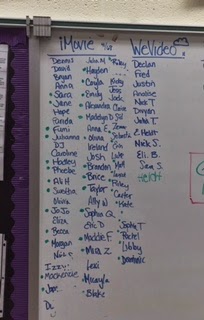
    • 2/3 of my students chose the iMovie app
      • most of them did everything from a personal device
      • they could access all of their pictures, emails from family, Google Docs, music, audio recordings / they saw their device as a studio
      • our students had to sign-up for WiFi in or building; a basic document which also included a parent permission component
  • WeVideo
    • for those who want the cloud & the ability to work from any device, home or school
    • does not have all of the bells and whistles of iMovie / a stripped-down version
    • a little more than 10% of my students chose this option
    • they worked from various devices (you can't do everything from the app that you can from the online/web version)
    • the videos look and sound just as good as anything made on iMovie
  • Garageband
    • for those who just want to create an audio podcast
    • our students have experience with the program through music class
    • if they chose this option I stipulated that they needed to employ other voices as well
      • interviews, conversations, snippets of their parent/grandparent sharing an anecdote
    • about 10% of my students chose this option
      • it was good for students who had trouble accessing family photographs
      • also, it was good for students who wanted to focus their energy editing/including other people's voices within the podcast
  • VoiceThread
    • another cloud-based option
    • allows for images, video, and multiple voices/recordings
    • plays more like a tricked-out slideshow
    • initially some students thought they would choose this, but after seeing me demonstrate iMovie and WeVideo they went for those other options.
    • none of my students opted for VT
After finishing the projects, students uploaded their videos/podcasts to YouTube--which I need to take a moment to explain and clarify.

We are a Google-oriented school. All of our students are given a school Google email address. Many services come with that--use of Docs, Drive, Calendar, etc.

And YouTube. As I am typing this, I clicked the little checkerboard box up in the top, right-hand corner of the page. All of those apps/features are a part of the Google in Education partnership. If you simply click on the YouTube icon you are taken a personal YouTube channel connected with the school account. 

The YouTube security is set differently for each school and age group. Your IT administrators would have more information about your individual buildings. 

When students uploads a project they should select "Unlisted" and not "Private" or "Public"..."Private" means only they can see it even if they share it with you. "Public" means anyone can see it and search for it. This setting can always be changed.

When they upload it to their own channel, they can then share it with you. There is a share feature under the YouTube video screen where they would type in your school email address.

Once they do this, I receive an email with the video in it and can select to "add to" my YouTube playlist.

When you make a YouTube playlist, all of the videos you put in it can be watched by anyone you give access to--again you can set and change the privacy settings at will.

Final Thoughts
No matter how much preparation you put into a digital project, you will face problems that you need to troubleshoot.

I am still dealing with a handful of students who cannot upload their projects to me. They created them on a computer at home and--according to them--nothing is working. Several things could be at play here; the student may never have done the project; the video really is there but a setting in their home-computer or WiFi is creating problems; they created and saved it as something too large to upload---the possibilities go on. 

Some of the problems are more transparent--kids will need a lot of repetition and support in how to best show a picture in their video or why they need to speak slowly and clearly or why silence and pauses matter.

Sometimes, programs and apps will be quirky. They just will. I can't explain it. That said, for as rewarding as the final products can be--and for as much writing and planning that you and your students will do--creating digital texts requires time and patience and flexibility. From you, yes. But we will have to remember that all of the roadblocks, quirks, and unexpected problems with technology (or in the gaps in our collective knowledge) is an opportunity for us to make the time to model patience and flexibility and problem-solving with our students.


Saturday, February 21, 2015

Between the Bright Horizons

Once asked to take a picture of my writing desk I pointed the camera outside to the sunrise. In my yard, the sun leaks through the tall hemlock. It floods through the gaps where the soft wood snapped beneath the weight of ice. Limbs crash down every winter. And they are replaced by sunrise in the mornings.

The morning is my writing desk while the afternoon and evening are my reading lamps. I can write immediately upon waking, but I don't. The dogs preclude me from hopping right to it. They need to be fed, let out, fussed over. All is quiet outside save for the huff and grunt of labrador. They scuff across the hard, week-old, snow and chase the scent of rabbit and deer. Tiny prints pressed in slender trails that end at fences. 

On workdays, I steal the time between tending the dogs and a shower and start a blog post or revise a manuscript. During the drive to work and until the moment the workday begins, I write. Even though I am not in front of a computer or clean sheet of paper, I am still writing. More often than not I am driving and prewriting or revising through my eyes and imagination. If it is in the morning, then I am writing. The radio is down or off. And I look and think and imagine. Occasionally I stop and take a picture.

The backroads can be terribly empty during the morning. But it leaves time and space to pull over. And look.

And then I spend my day working with everyone else's writing.

Weekends allow for longer stretches of writing in the morning. The season does not matter. I begin while it is dark. Write through sunrise. And stay with it until the day is stretched out in full brightness like Andrew Wyeth landscape, where the day has chased away most of the evening's shadows and much of what remains are the textures, shadows, and marks of the people we encounter between the bright horizons.
Andrew Wyeth, The Carry, 2003, tempera on panel.
.